Third Party Import: Briefing
How to Brief the Marketing Automation Team for Import Requests. As a marketer, providing clear and comprehensive briefs to us (The marketing automation team) is essential for successful data import p…

How to Brief the Marketing Automation Team for Import Requests
As a marketer, providing clear and comprehensive briefs to us (The marketing automation team) is essential for successful data import processes. Whether you’re dealing with new prospects, update on interaction,... following these guidelines will ensure smooth execution.
Steps to take into account:
- Not sure if your list is valid? Check the workflow chart (image below or Miro board)
- Filter your list
- Utilize the import template: Template_Import_List.xlsx
- Utilize the submission form to process the request: CORP INFO List Import (Third-Party) FORM
1. Is your list valid?
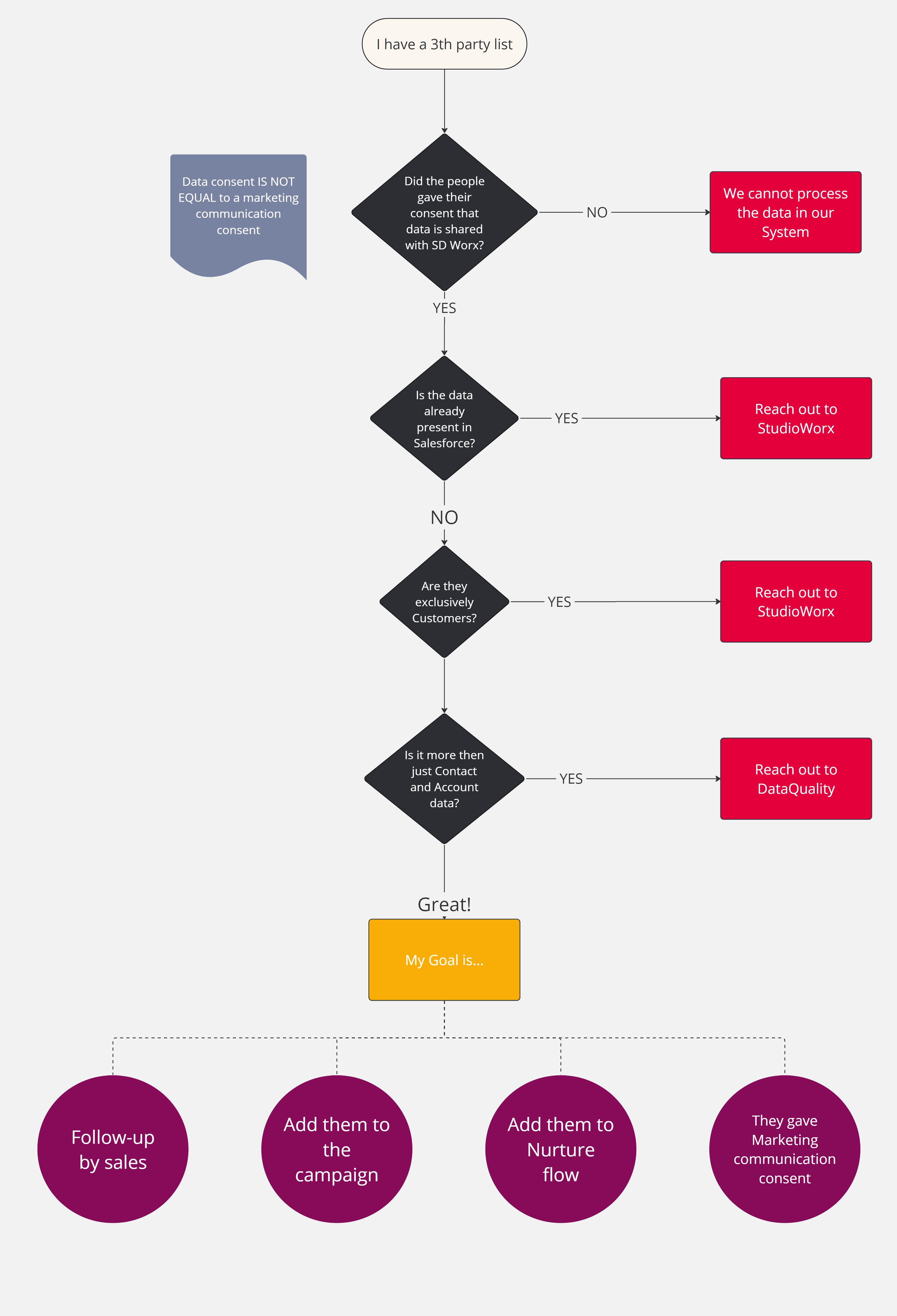
2. Filter the list
Lists can be filled with usefull data, but maybe also data that we do not want to have in our CRM.
Analyse your list and remove data that matches these kind of criteria:
Data types | Examples |
Bad data (Email) | Emails like: mickey.mouse@Idontcare.com, 1214143@gmail.com, fa@fa.com |
Competitors | John Doe from Acerta (Belgian competitor), Joanna Doe from ADP (International competitor) |
Unrelevant contacts | Martha Stewart - Student from University college, Brent Adams - Electrician from Lightbulb |
3. Utilize the Import Template
The import template: Template_Import_List.xlsx
Mandatory fields
When briefing a list for data import, ensure that you fill in the following mandatory fields:
- First Name
- Last Name
- Communication Language
- Company
These fields are essential and the minimum for us to start working on the list.
Optional Fields
While the mandatory fields are critical, consider including optional fields for richer demographic data:
- Job Title
- Phone
- Temporary Comments: Extra comments that Sales will see on opportunity to help them in their selling process.
Additional Information Fields
For further detail, you can input campaign specific data into the following fields:
- CM Campaign, Medium, and Source: Useful for tracking the effectiveness of specific campaigns.
- CM Text 1 and 2
- CM Comments 1 and 2
- Partner: Exclusively for personalizing email messages based on partner relationships.
How did we do?
Third Party Import: General