LinkedIn Ads: UTM parameters are set automatically
In LinkedIn Campaign Manager you don't need to add UTM parameters yourself. Every SD Worx ad account has account-level URL parameters. LinkedIn adds them to every click on every ad in the account. Yo…

In LinkedIn Campaign Manager you don't need to add UTM parameters yourself. Every SD Worx ad account has account-level URL parameters. LinkedIn adds them to every click on every ad in the account. Your part is the ad set name.
What you do
- Name the ad set with the UTM Calculator in the Marketing Hub. In LinkedIn the naming convention goes on the ad set, not on the campaign. Since 2026, LinkedIn calls the old campaign group "campaign" and the old campaign "ad set". LinkedIn ad set names start with
li-. - Use the plain landing page URL as destination URL, without UTM parameters.
- Leave the URL parameters on ad set and ad level empty. On the ad set, the account parameters replace them anyway.
If your ads already have UTM parameters in the URL
LinkedIn doesn't remove UTM parameters from the destination URL. It adds the account parameters behind them. Then the click arrives with each parameter twice. Google Analytics uses the last value, Account Engagement and Salesforce use the first. Salesforce then links leads and opportunities to the wrong campaign, or to none.
So please remove UTM parameters from the destination URLs of your ads. I saw them in Finland, Belgium, the Netherlands, Romania, Ireland, Luxembourg, Sweden and SAP Solutions.
What is set
These parameters are set on account level:
Parameter | Value |
| the ad set name |
| the ad set ID |
| the ID of the ad |
| |
| cpc |
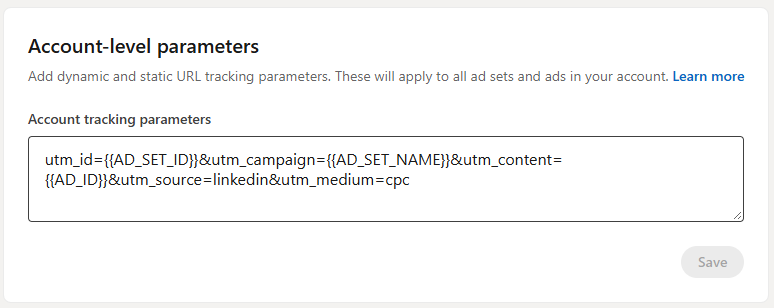
In Campaign Manager the line looks like this:
utm_campaign={{AD_SET_NAME}}&utm_id={{AD_SET_ID}}&utm_content={{AD_ID}}&utm_source=linkedin&utm_medium=cpc{{AD_SET_NAME}} and the other values in curly brackets are placeholders. LinkedIn replaces them when someone clicks. Don't use {{CAMPAIGN_NAME}}: in LinkedIn it gives the campaign name, not the ad set name with our naming convention.
Recruitment has its own ad account. There, utm_source is the ad set name, because Teamtailor only shows utm_source. See Teamtailor ad campaign links.
Good to know
- The ad set preview can be wrong. Under "Full URL parameters" in an ad set, Campaign Manager may still show the values of the ad set. The clicks arrive with the account parameters, I checked this in Google Analytics.
- Conversation ads and message ads don't get the account parameters. If you use them, let me know.
- Spaces in the ad set name arrive as
+. Names from the calculator have no spaces, so this only matters for other names. - Google Ads, Microsoft Ads and OpenAI Ads work the same way. Meta is different, see Meta ads (Facebook and Instagram): tracking setup.
Check your account
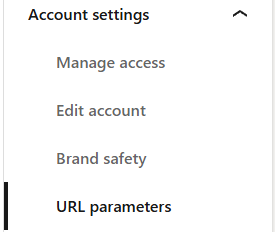
In Campaign Manager, open Account settings and then URL parameters. Under Account-level parameters you should see the line from "What is set". The order of the parameters can be different. If the field is empty or a parameter is missing, let me know.
Questions
Contact Clemens.Siebenhaar@sdworx.com.
How did we do?
Social advertising courses / trainings
Meta ads (Facebook and Instagram): tracking setup