Meta ads (Facebook and Instagram): tracking setup
In Meta Ads Manager there is no tracking template for a whole campaign or account. Tracking is set on each ad, in the section Tracking when you edit the ad. Two settings matter there: the pixel under…

In Meta Ads Manager there is no tracking template for a whole campaign or account. Tracking is set on each ad, in the section Tracking when you edit the ad. Two settings matter there: the pixel under Website events and one short line in URL parameters. Both are the same for every ad. Meta fills in the names and IDs itself, so you never need to change the line.
What you do
- Name the campaign with the UTM Calculator in the Marketing Hub. Meta campaign names start with
fb-orig-. - Use the plain landing page URL as website URL, without UTM parameters.
- Under "Website events", choose SD Worx Group's Pixel. Some ad accounts also offer a country pixel, for example "SD Worx Germany's Pixel". It only receives page views, so Meta would show no conversions for the ad. If no pixel is selected, select the Group pixel.
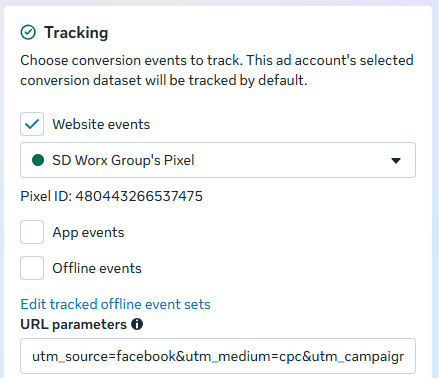
- Paste this line into "URL parameters":
utm_source=facebook&utm_medium=cpc&utm_campaign={{campaign.name}}For campaigns starting withig-, useutm_source=instagram. The calculator shows the right line for your campaign.
Don't put a?at the start. Meta turns it into%3F, and thenutm_sourcegets lost. - Don't add more parameters. Leave out
utm_content,utm_idandutm_term. Meta adds them itself, see below.
Lead form ads without a link to our website need neither the pixel nor the line.
Recruitment campaigns end in -rcrt. For them, utm_source is the campaign name, because Teamtailor only shows utm_source:
utm_source={{campaign.name}}&utm_medium=cpc&utm_campaign={{campaign.name}}See Teamtailor ad campaign links.
What Meta adds
When a click leaves Meta, Meta adds every UTM parameter that is missing from the URL:
Parameter | Value |
| the campaign ID |
| the ad set ID |
| the ad ID |
I checked this with the clicks from our own ads. Our reports use the campaign ID to link a visit to the right campaign, even if the campaign is renamed later. The ad ID is needed for results per ad.
Meta only adds a parameter if it's missing. If you set utm_content yourself, for example to video, Meta doesn't add the ad ID. Then the reports can't show results per ad.
Keep utm_source and utm_medium in the line, though. Without them Meta adds its own values, fb and paid, which don't match our other platforms.
Why {{campaign.name}} and not the name itself
{{campaign.name}} is a placeholder. Meta replaces it with the campaign name when someone clicks. A name typed by hand often ends up different from the real one: the ad set name instead of the campaign name, a typo, or an old name after a rename. The placeholder is always right.
Don't use {{adset.name}} for utm_campaign. It gives the ad set name, not the campaign name.
Running ads
If you change the URL parameters or the pixel of a running ad, Meta reviews the ad again. For the pixel, the review took about two minutes in my test, and the ad kept running. Use the line for new ads. For a running ad, decide yourself whether the fix is worth a new review.
Why no UTM parameters in the website URL
If the website URL already has UTM parameters, the click arrives with some parameters twice. Google Analytics uses the last value, Account Engagement and Salesforce use the first. Salesforce then links leads and opportunities to the wrong campaign, or to none.
Good to know
- Google Ads, Microsoft Ads, LinkedIn and OpenAI Ads set the UTM parameters automatically. Apart from YouTube video campaigns, Meta is the only place where you add them yourself. See Google Ads: UTM parameters are set automatically.
Questions
Contact Clemens.Siebenhaar@sdworx.com.
How did we do?
LinkedIn Ads: UTM parameters are set automatically
How to download and process LinkedIn Invoices