Google Ads: UTM parameters are set automatically
In Google Ads you don't need to add UTM parameters yourself. A script in our Google Ads manager account sets them on every active campaign, in all SD Worx Google Ads accounts. Your part is the campai…

In Google Ads you don't need to add UTM parameters yourself. A script in our Google Ads manager account sets them on every active campaign, in all SD Worx Google Ads accounts. Your part is the campaign name.
One exception: YouTube video campaigns. The script can't change them, so you set their tracking template yourself. See the section on YouTube video campaigns below.
The script does not cover the Google Ads accounts of Protime, Strobbo and SD Worx Staffing Solutions.
What you do
- Name the campaign with the UTM and Naming Convention Generator. For Google Ads you only need the campaign name. The generator is described in UTM Parameters & Calculator Guidelines.
- Use the plain landing page URL as final URL, without UTM parameters.
- Leave the tracking template fields empty, on campaign, ad group, ad, keyword, sitelink, asset and asset group level.
That's it. The script runs every hour and sets the parameters.
YouTube video campaigns: set the template yourself
This applies to campaigns of the type Video in Google Ads. Demand Gen campaigns with videos are not affected, the script handles them.
- Create the campaign name with the UTM and Naming Convention Generator: Search & Display, campaign type youtube, ad format video. The name starts with
yt-. - In the campaign, go to Settings, then Campaign URL options.
- Enter this tracking template and replace
CAMPAIGN_NAMEwith the exact campaign name:{lpurl}?utm_campaign=CAMPAIGN_NAME&utm_id={campaignid}&utm_content={creative}&utm_source=youtube&utm_medium=cpcExample:{lpurl}?utm_campaign=yt-de-de-ao-tofu-awareness-youtube-test-26xx001-all&utm_id={campaignid}&utm_content={creative}&utm_source=youtube&utm_medium=cpc - Leave the tracking template of the video ads empty. A template on an ad replaces the campaign template.
- Use the plain landing page URL as final URL, without UTM parameters.
Please don't use the tracking template the generator shows for youtube at the moment. It still sets utm_source=google and has no utm_id. We're updating the generator.
If you rename a video campaign, update the name in the template as well.
What the script sets
Every hour, for every active campaign:
- It sets a tracking template on the campaign and a custom parameter
_campaignwith the campaign name. - It clears tracking templates on lower levels: ad groups, ads, keywords, sitelinks and other assets, and Performance Max asset groups. In Google Ads the most specific template wins. A template on an ad group or asset group would replace the campaign template, and the click would arrive without our parameters.
The parameters in the template:
Parameter | Value |
| the campaign name |
| the campaign ID from Google Ads |
| the ID of the ad |
| depend on the campaign name, see below |
| the keyword, for Search and Performance Max |
utm_source and utm_medium come from the campaign name:
Campaign name contains |
|
|
| display | |
| youtube | cpc |
| display | |
| display | |
anything else (Search) | cpc |
Recruitment campaigns end in -rcrt. For them utm_source is the campaign name, because Teamtailor only shows utm_source. See Teamtailor ad campaign links.
Why no UTM parameters in the final URL
If the final URL already has UTM parameters, the click arrives with each parameter twice: once from the final URL, once from the template. Google Analytics uses the last value, Account Engagement and Salesforce use the first. Salesforce then links leads and opportunities to the wrong campaign, or to none.
Good to know
- New campaigns get the template within an hour. Clicks before that still show up in Google Analytics through Google Ads auto-tagging, but Salesforce doesn't get a campaign for them.
- Renamed campaigns get the new name in
utm_campaignwithin an hour. - Custom parameters on campaign level are replaced by
_campaign. Please don't add your own. - Ads that Google doesn't let us change, for example disapproved ads, keep their old template. Pause them if they are no longer needed.
Check a campaign
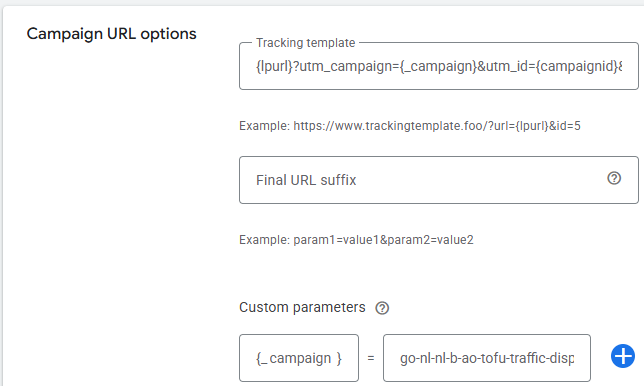
Open the campaign, go to Settings, then Campaign URL options. You see the tracking template and the custom parameter _campaign with the campaign name.
Questions
Contact Clemens.Siebenhaar@sdworx.com.
How did we do?
OpenAI Ads (ChatGPT ads): tracking setup
Understanding Google Ads Conversions