OpenAI Ads (ChatGPT ads): tracking setup
Tracking for ChatGPT ads is set up centrally. Your part is the campaign name and one line of parameters on the campaign. ChatGPT ads are booked in the OpenAI Ads Manager. Each country has its own ad…

Tracking for ChatGPT ads is set up centrally. Your part is the campaign name and one line of parameters on the campaign.
ChatGPT ads are booked in the OpenAI Ads Manager. Each country has its own ad account.
What you do
- Name the campaign with our naming convention, the same as for other paid campaigns. ChatGPT ads campaigns start with
oa-(for OpenAI), followed by country and language. Example:oa-be-fr-tl-tofu-reach-hr_trends-26am001-sme. The campaign code, like26am001, must be in the name. - Use the plain landing page URL, without UTM parameters. Link to the website of your own country.
- On the campaign, fill in "Tracking parameters" with this line. Replace
CAMPAIGN_NAMEwith the exact campaign name:?utm_source=openai&utm_medium=cpc&utm_campaign=CAMPAIGN_NAME&utm_id={campaign_id}&utm_content={ad_id}Leave the parts in curly brackets as they are. ChatGPT fills in the IDs when the ad is clicked.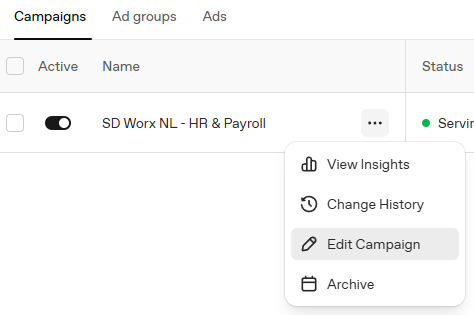
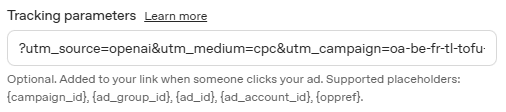
- Leave "Tracking parameters" empty on ad groups and ads. A value on an ad group or ad replaces the value on the campaign.
Don't add oppref yourself. ChatGPT adds it to every click automatically, and adding it again causes an error.
If you rename a campaign, update the name in the parameters as well.
Conversions
Each ad account has the same conversions. Each conversion groups the key events of one intent level:
Conversion in ChatGPT ads | Key events | Intent |
Lead created | commercial request (sales contact forms, Calendly meetings), demo request | high |
Registration completed | resource request (gated content like whitepapers and webinar recordings), webinar registration, event registration | medium |
Subscription created | newsletter subscription | low |
It's the same split as the conversion goals in Google Ads: request quote, submit lead form and sign-up. The key events are described in Google Analytics 4 - key events setup.
Choosing an optimisation goal: A conversion-optimised campaign optimises for one conversion, chosen when you create the campaign. For campaigns that should bring leads, choose "Lead created". "Registration completed" brings more conversions, but they are mostly downloads and webinar sign-ups.
Why the numbers differ from Google Analytics
- One conversion, several key events. "Lead created" counts commercial requests and demo requests together. Compare it with the sum of both key events in GA4, not with one.
- Consent. We only send conversions to ChatGPT ads for visitors who accepted marketing cookies. Google Analytics usually counts more.
What is set up centrally
You don't need to do anything for this, it's here for reference.
- The ChatGPT ads pixel on our websites, for every country with an ad account. It only loads after the visitor accepts marketing cookies.
- The Conversions API: our server sends the same conversions to ChatGPT ads. This makes the measurement more complete. Pixel and server send the same event ID, so a conversion is not counted twice.
- The conversions in every ad account, see above.
In our reports, visits from ChatGPT ads show up in the channel Paid AI. Links from ChatGPT answers that are not ads stay in Organic AI. This only works with utm_medium=cpc, which is one more reason to use the parameter line above.
Questions
Tracking: Clemens.Siebenhaar@sdworx.com
How did we do?
New Negative Keyword List Template
Google Ads: UTM parameters are set automatically