Microsoft Ads (Bing Ads): UTM parameters are set automatically
In Microsoft Advertising, often still called Bing Ads, you don't need to add UTM parameters yourself. A script in our Microsoft Advertising manager account sets them on every active campaign in the S…

In Microsoft Advertising, often still called Bing Ads, you don't need to add UTM parameters yourself. A script in our Microsoft Advertising manager account sets them on every active campaign in the SD Worx accounts. Your part is the campaign name.
The script runs once a day, at 6 pm (CET). New or renamed campaigns get the right parameters that evening.
What you do
- Name the campaign with the UTM and Naming Convention Generator. For Microsoft Advertising you only need the campaign name. Microsoft campaign names start with
bi-. The generator is described in UTM Parameters & Calculator Guidelines. - Use the plain landing page URL as final URL, without UTM parameters. This also applies to sitelinks and other extensions.
- Leave the tracking template and the final URL suffix empty on ad group, ad and keyword level, and on sitelinks.
If you import campaigns from Google Ads
Microsoft Advertising can import campaigns from Google Ads, once or on a schedule. By default the import copies the Google tracking templates and custom parameters as well. They don't work in Microsoft and overwrite the parameters the script set.
In every import, open the import options. In the section Campaign, uncheck the row Tracking templates, custom parameters, and final URL suffixes, in both columns Import new and Sync existing.
Imported campaigns keep their Google name, which starts with go-. Please rename them so they start with bi-.
What the script sets
Every day, for every active campaign:
- It sets a tracking template on the campaign and a custom parameter
_campaignwith the campaign name. - It clears tracking templates on ad groups and keywords. In Microsoft Advertising the most specific template wins, so a template on an ad group would replace the campaign template.
The script can't change ads, sitelinks and final URL suffixes. That's why steps 2 and 3 above matter. If an ad already has its own tracking template, the Microsoft Advertising interface doesn't save an empty field. Please let me know and I'll fix it.
The parameters in the template:
Parameter | Value |
| the campaign name |
| the campaign ID from Microsoft Advertising |
| the ID of the ad |
| bing |
| cpc, or display for display, audience and Performance Max campaigns |
| the keyword, for search campaigns |
utm_medium comes from the campaign name:
Campaign name contains |
|
| display |
anything else (Search) | cpc |
Recruitment campaigns end in -rcrt. For them utm_source is the campaign name, because Teamtailor only shows utm_source. See Teamtailor ad campaign links.
Why no UTM parameters in the final URL
If the final URL already has UTM parameters, the click arrives with each parameter twice: once from the final URL, once from the template. Google Analytics uses the last value, Account Engagement and Salesforce use the first. Salesforce then links leads and opportunities to the wrong campaign, or to none.
Good to know
- New campaigns get the template the same evening. Clicks before that arrive without our parameters, so Google Analytics and Salesforce can't link them to the campaign. Depending on when you start the campaign, that can be up to a day.
- Custom parameters on campaign level are replaced by
_campaign. Please don't add your own. - Google Ads works the same way, with a script that runs every hour. See Google Ads: UTM parameters are set automatically.
Check a campaign
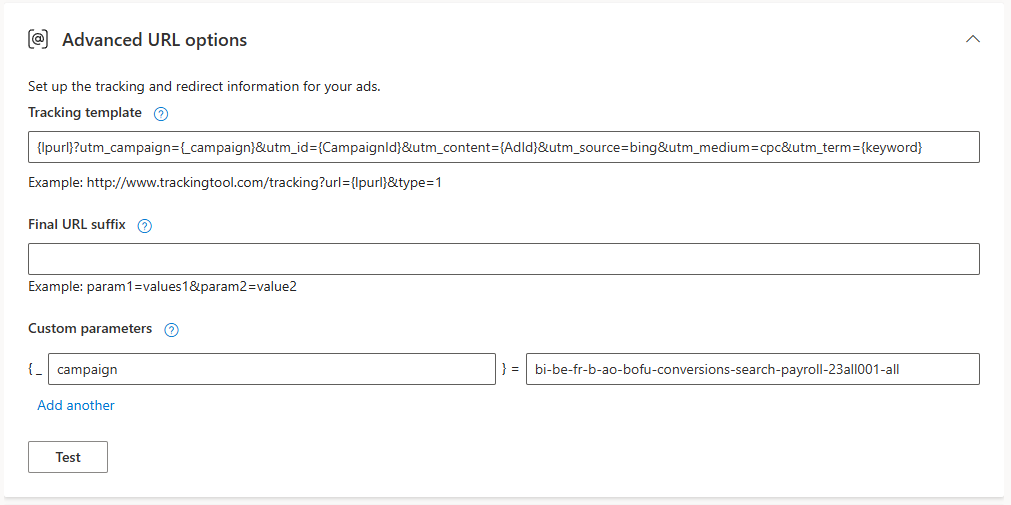
Open the campaign and click Edit campaign at the top right. Expand Advanced settings and scroll down to Advanced URL options. Close it with Cancel afterwards, so nothing changes.
For a search campaign it looks like this:
- Tracking template:
{lpurl}?utm_campaign={_campaign}&utm_id={CampaignId}&utm_content={AdId}&utm_source=bing&utm_medium=cpc&utm_term={keyword} - Final URL suffix: empty
- Custom parameters:
{_campaign} =the campaign name, for examplebi-be-fr-b-ao-bofu-conversions-search-payroll-23all001-all
If you see something else on an active campaign, wait for the next evening run. If it is still different the next day, let me know.
Questions
Contact Clemens.Siebenhaar@sdworx.com.
How did we do?
Google Ads: UTM parameters are set automatically
Understanding Google Ads Conversions